
CorelDRAW Graphics Suite
Professional vector illustration and graphic design suite covering illustration, layout, photo editing, and typography on Windows and macOS.

CorelDRAW Graphics Suite — Key Facts
- Latest Version
- Latest
- License
- Trial
- Category
- Graphic Design
- File Size
- 8 GB
- Price
- Free to download
- Official Site
- www.anrdoezrs.net
- User Rating
- ★ 3.9 / 5 (85 ratings)
CorelDRAW Graphics Suite Screenshots
About CorelDRAW Graphics Suite
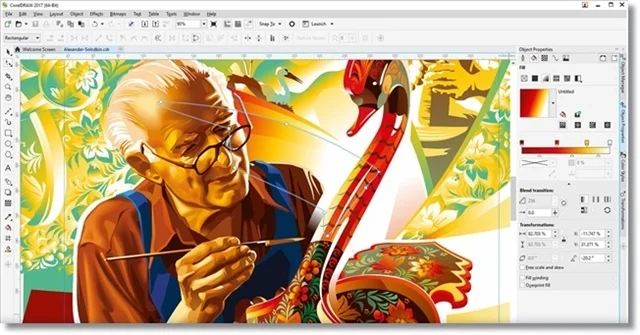
The coreldraw graphics suite download brings a full professional design package to Windows and macOS, aimed at illustrators, layout artists, and image editors who need every tool in one place. At its core you get CorelDRAW for vector work, Corel Photo-Paint for raster editing, Corel Font Manager for typography, Capture for screen grabs, and AfterShot 3 HDR for photo processing — five focused applications sharing a single install that weighs in at roughly 8 GB. If you're new to vector tools, a vector is a path defined by anchor points and bezier curves rather than pixels, which means artwork scales to any dpi without quality loss. graphic design
Working inside CorelDRAW, you draw with node-editable bezier curves, apply stroke and fill settings per object, and stack everything across named layers — a familiar mental model if you've used Illustrator. The suite ships with over 7,000 cliparts and templates, 1,000 high-resolution digital photos, and more than 1,000 OpenType fonts ready to drop onto any artboard. Corel Connect, the content organiser, indexes all bundled assets alongside your own library and hooks into Microsoft OneDrive so projects stay in sync across machines. windows Export options span SVG, PDF, EPS, and common raster formats, so handing files to a print shop or web developer rarely needs a format conversation. vector
The AI Generate docker — part of Corel's "Artist Intelligence" push — lets you produce or rearrange image elements from a text prompt or reference image directly inside the drawing canvas, a capability that Adobe Illustrator added only recently as a separate beta. Perspective drawing supports one-, two-, and three-point setups, letting you place illustrated scenes or objects in convincing spatial depth without leaving the vector environment. Gradient mesh fills, envelope distortion, and blend effects extend beyond what beginners need, so expect a learning curve. The suite is a Trial license, meaning full features are accessible for a limited period before a purchase is required. trial
For professional print and branding work, CorelDRAW Graphics Suite remains one of the few genuine alternatives to Adobe's subscription ecosystem, particularly strong on Windows where its color management and alignment tools have decades of refinement. The interface supports custom workspaces modelled on Photoshop and Illustrator layouts, easing migration. Beginners may find the asset library alone worth the trial period — 150 professionally designed templates cover vehicle wraps, signage, and social formats. Check the graphic design hub for comparisons, and see illustration adjacent tools if you need a lighter starting point.
CorelDRAW Graphics Suite is a trial graphic design available for Windows, macOS. Browse more vector software or illustration programs.